
If you’re buying crypto for the first time, the app you pick decides how easy the first buy is, what you pay for it and how well your account is protected. I’ve set up a Coinbase account and walked through its sign-up and buy screens, and it’s the app I’d point a beginner to first.
Crypto prices swing hard, and crypto isn’t covered by the protections your bank deposits have. Before you put money in, read the SEC’s investor education page on crypto assets. It takes five minutes.
Here’s what I looked for in a beginner’s crypto app, and how Coinbase measures up.

Earn up to $2,000 when you buy $50 in crypto. Terms apply. New US users only: a single first purchase of $50 or more gets a random Bitcoin reward of $10 to $2,000, and 99% get $10 to $100. Assets and offer as of October 2026.
- Stores more digital assets than any other company
- Customer assets held 1:1 and never lent without permission
- Two-factor authentication on by default, with security key support
- Hundreds of cryptocurrencies, including Bitcoin and Ethereum
- Publicly traded U.S. company (NASDAQ: COIN) that files reports with the SEC
Make Your First $50 Crypto Buy on Coinbase and Get a Bitcoin Reward
That reward is a random Bitcoin amount from $10 to $2,000 for new US users whose first purchase is a single buy of $50 or more. 99% of users get $10 to $100, and 1% get $1,000 or $2,000 (as of October 26, 2026).
What makes a crypto app good for beginners
You don’t need the most coins or the fanciest charts on day one. You need these:
- A sign-up that tells you what’s next. Verification and funding shouldn’t be a guessing game.
- A buy screen you can’t get lost in. Pick a coin, pick an amount, pick how to pay.
- Fees you see before you confirm. Not after.
- Security that’s on by default. Login protection shouldn’t be something you have to go find.
- A company you can look up. Public filings beat a slick website.
Here’s how Coinbase stacks up on each one:
| What beginners need | Coinbase |
|---|---|
| Guided sign-up | A checklist: create the account, verify your info, deposit cash, make your first trade |
| Simple buying | One Buy screen with the amount, the payment method and the coin |
| Payment options | Bank account, debit card or PayPal |
| Fees shown up front | Coinbase’s fee and the spread are both on the preview screen before you confirm |
| Security defaults | Two-factor authentication on automatically, with security key support |
| Who’s behind it | A public company listed on Nasdaq (COIN) that files reports with the SEC |
Why Coinbase is the best crypto app for beginners
Sign-up tells you exactly what’s left
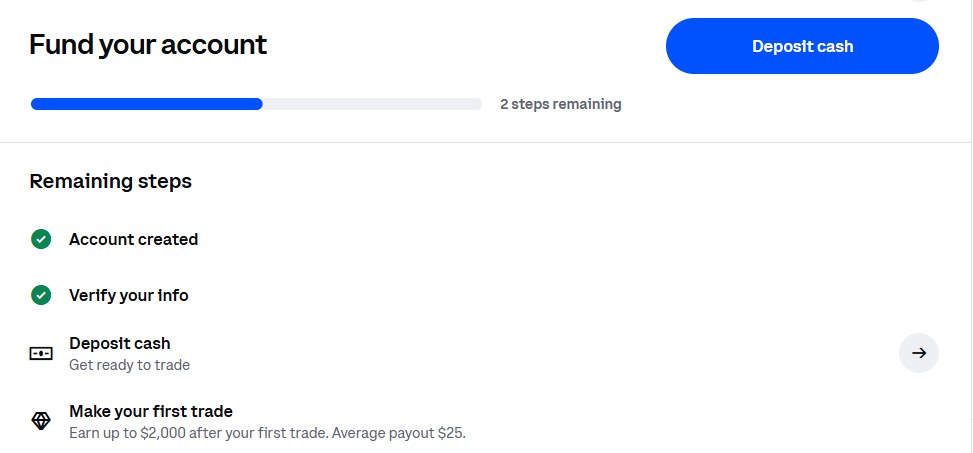
After I created my account and verified my info, Coinbase showed a short checklist of the remaining steps: deposit cash, then make your first trade. There’s a progress bar across the top, so you always know how close you are.
Buying is one screen
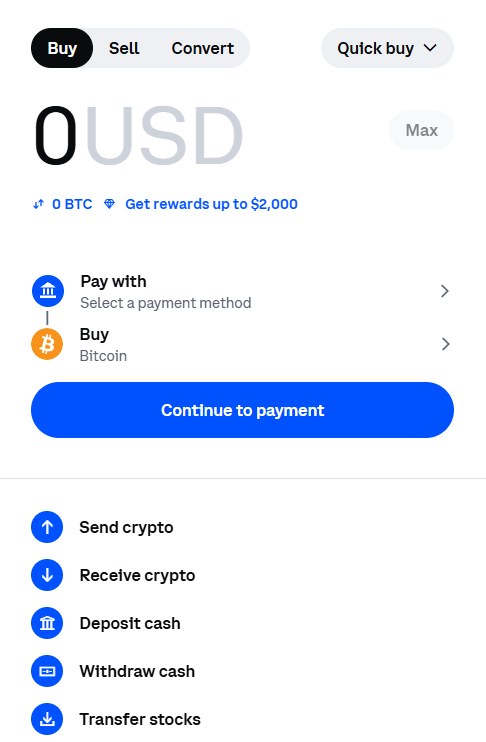
The Buy screen has three things on it: how much you want to spend, how you want to pay, and which coin you’re buying. Bitcoin is already selected when it opens. Hit Continue to payment and you’re on the last step. The same panel has Sell and Convert tabs for later, and shortcuts to send, receive, deposit and withdraw.
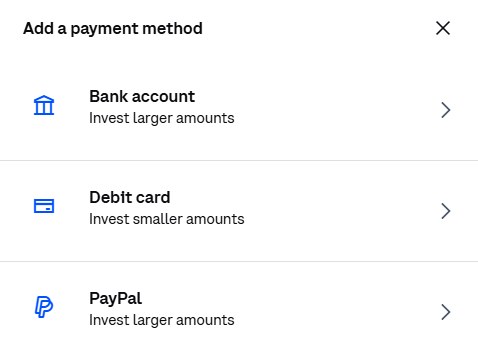
When I went to add a way to pay, Coinbase offered three: a bank account, a debit card or PayPal.
You see the fee before you confirm
A simple buy on Coinbase carries a Coinbase fee plus a spread. The fee depends on things like how you pay and the size of the order, so there isn’t one number to quote. What I like is that both show on the preview screen before you confirm, so you know the cost before you’re committed.
Security is switched on for you
Coinbase signs every account up for two-factor authentication automatically, and you can add a hardware security key. It holds customer assets 1:1 and says it doesn’t lend them out or act on them without your permission. An independent third party audits it every year. If you want an extra layer for savings you won’t touch, Coinbase Vault requires more than one approval before a withdrawal goes through.
It’s a public company
Coinbase trades on Nasdaq under COIN, so it files reports with the SEC that anyone can read. As of June 30, 2026, it reported $246 billion in assets on its platform and service in 100+ countries.
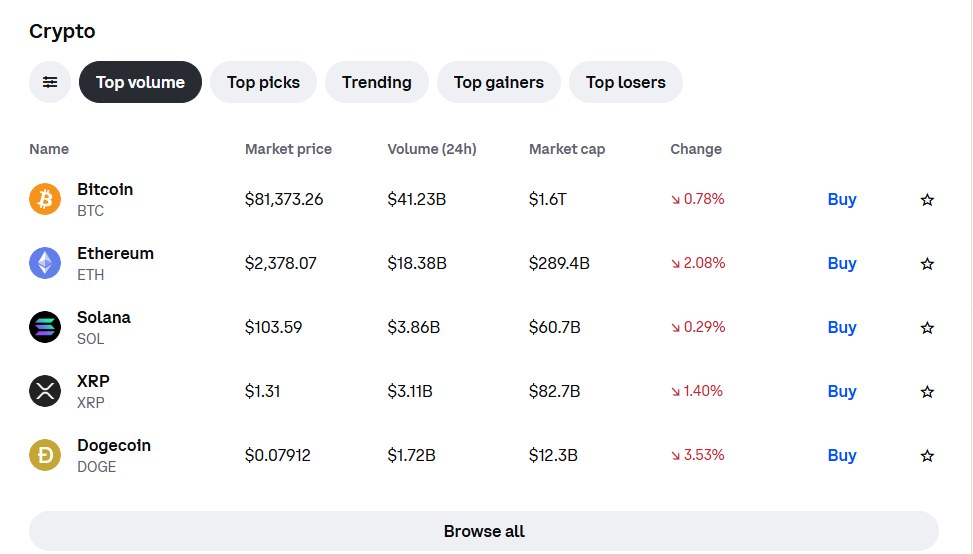
The Trade page lists the coins by trading volume, with the price and the day’s change next to a Buy button for each one. Bitcoin, Ethereum and Solana sat at the top when I checked.
Open Coinbase and Make Your First $50 Crypto Buy
The new-user Bitcoin reward
Coinbase new-user reward (as of October 26, 2026)
- New US users only
- Make a single first purchase of $50 or more
- Get a random Bitcoin reward from $10 to $2,000
- 99% of users get $10 to $100; 1% get $1,000 or $2,000
- The first purchase has to happen within 1 year of signing up
- Several smaller buys adding up to $50 don’t count, and neither does crypto you transfer in
- Can’t be combined with other offers; limited while supplies last
Sign up and make your first $50 buy to qualify.
The order of steps is what trips people up. If your first buy is anything under $50, you’ve used up your first purchase and the reward is gone. Make the first one a single $50 buy.
How to buy your first crypto on Coinbase, step by step
Here’s the order I’d follow on the Coinbase app, start to finish:
- Create your account. Coinbase marks it done on the checklist as soon as you’re in.
- Verify your info. Coinbase asks you to confirm your identity before you can buy. The checklist ticks it off when it’s approved.
- Add a way to pay. Pick one of the three options Coinbase offers.
- Open the Buy screen. Choose the coin and the amount. If you want the new-user reward, make this one buy of $50 or more.
- Read the preview. Coinbase’s fee and the spread are both on it, so you see the full cost of the trade.
- Confirm. Your crypto shows up in your account, and Coinbase stores it for you.
Want to read up before you buy? Coinbase Learn has beginner guides like “What is cryptocurrency?” and “What is Bitcoin?”, a glossary of crypto terms and step-by-step tutorials. It’s free, and you don’t need to buy anything to use it.
Coinbase app vs. Coinbase Wallet
Coinbase has two apps with similar names, and it’s easy to download the wrong one. The main Coinbase app is a centralized crypto exchange: you buy and sell there, and Coinbase holds your crypto for you, 1:1. That’s the app this page is about, and it’s the one with the new-user reward.
Coinbase Wallet is a separate, self-custodial wallet app. You hold the crypto yourself, on Bitcoin, Ethereum, Solana and dozens of other chains, instead of Coinbase holding it. That control cuts both ways: keeping your access safe is on you. Start with the main app, and look at Wallet once you want to store crypto yourself.
When you outgrow the basics: Coinbase Advanced
Coinbase Advanced is Coinbase’s trading screen for experienced traders. It adds advanced charts, real-time order books, customizable layouts and more order types. Its fees on spot trades are volume-based and differ from the fees on a simple buy, so check them before you switch. On your first buy you won’t need any of it.
What to know before you start
- Crypto isn’t FDIC or SIPC insured. Coinbase isn’t a bank. Its crime insurance covers a portion of the digital assets it holds against theft, but not losses from someone getting your login.
- Prices move fast. Only buy what you can afford to see drop.
- Fees vary by how you pay. Check the preview screen before you confirm, every time.
- Coinbase One is optional. It’s a paid membership with lower trading costs. Basic is $4.99 a month or $49.99 a year, and you don’t need it to get started.
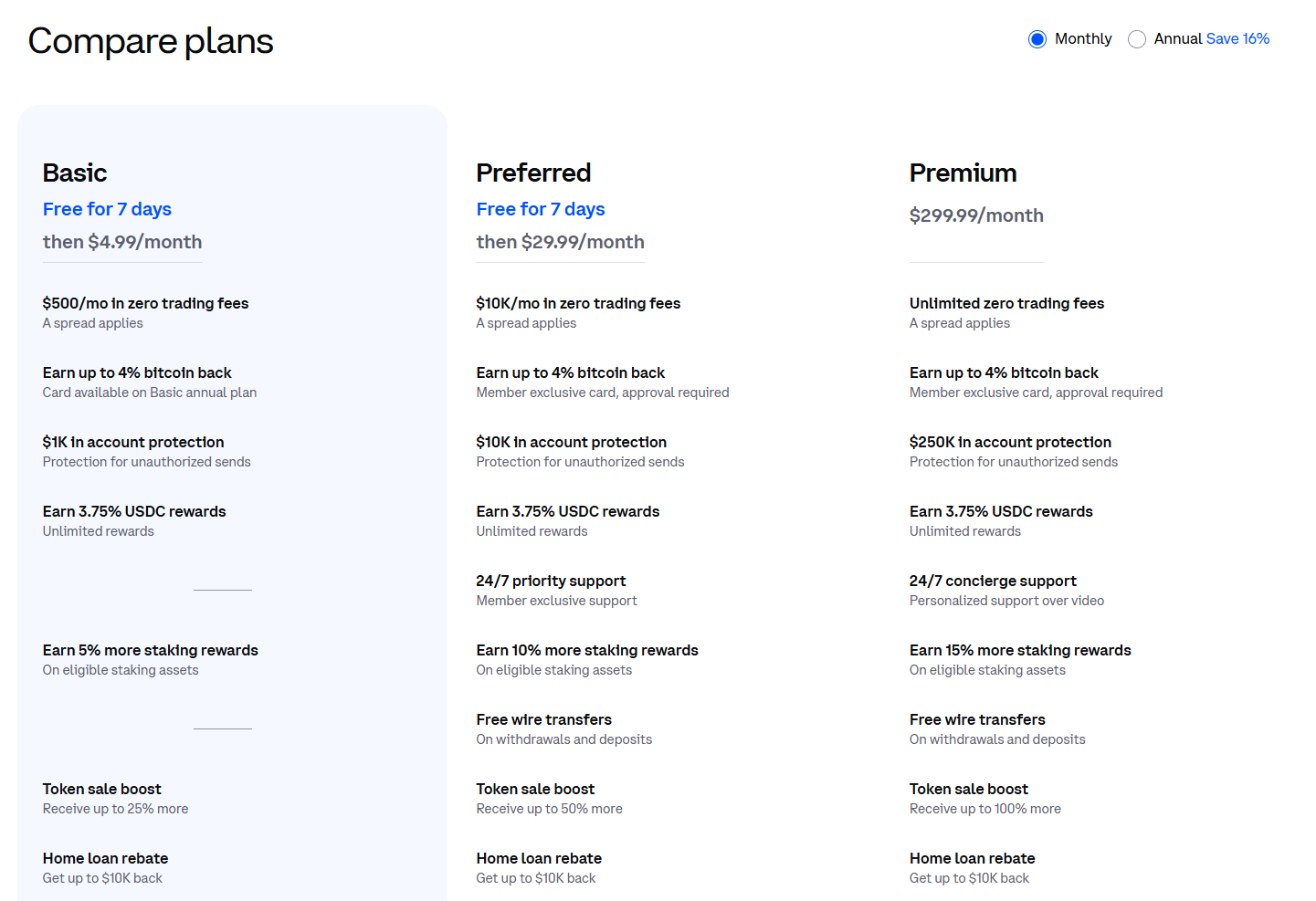
Coinbase One also has Preferred ($29.99 a month or $299.99 a year) and Premium ($299.99 a month or $2,999.99 a year) tiers. They’re built for people who trade a lot. As a beginner, skip them.
Is Coinbase the right first crypto app for you?
Pros
- The sign-up checklist shows you every step that’s left
- One Buy screen, with Bitcoin already selected
- Fee and spread shown before you confirm
- Account security switched on from day one
- Public company that reports to the SEC
Cons
- Fees on simple buys vary, so there’s no single rate to compare
- Crypto on Coinbase isn’t FDIC or SIPC insured
- The new-user reward needs a single first purchase of $50 or more
- The paid Coinbase One tiers are easy to confuse with the free account
If you want one app to make your first crypto buy, Coinbase is where I’d start. Open your account and buy your first $50 of crypto, and you’ll see the full fee on the preview screen before anything goes through.
Sign Up and Buy Your First Crypto on Coinbase
Yes. Sign-up gives you a checklist of what’s left, buying happens on one screen, and account security is on by default. You’ll see the fee and spread on the preview screen before you confirm a buy.
To get the new-user Bitcoin reward, your first purchase has to be a single buy of $50 or more. A smaller first buy forfeits the reward.
Coinbase holds customer assets 1:1, is audited every year by an independent third party, and turns on two-factor authentication for every account. Crypto isn’t FDIC or SIPC insured, though, so keep your login secure.
The Coinbase app is an exchange where you buy and sell, and Coinbase holds your crypto for you. Coinbase Wallet is a separate self-custodial app where you hold the crypto yourself. If you’re new to crypto, start with the main Coinbase app.
Yes. A simple buy or sell carries a Coinbase fee plus a spread, and the fee depends on how you pay, the order size and the coin. Both show on the preview screen before you confirm.