Is Rocket Money Worth It? (Quick Answer)
Most people are wasting $20–$100 per month on subscriptions they don’t even remember signing up for. Streaming services, old apps, forgotten free trials, and it adds up faster than you think.
That’s exactly where Rocket Money Premium earns its keep. Instead of just showing you where your money is going, it helps you find and cancel those charges automatically. And in most cases, canceling just one unused subscription can cover the entire monthly cost.
Is Rocket Money free?
Yes, Rocket Money has a free plan. It includes subscription tracking, budgeting, net worth and spending insights, and credit score monitoring. You only pay if you upgrade to Premium for unlimited budgets, automated savings, and premium subscription-cancellation and net-worth tools (as of 2026).
How much does Rocket Money cost?
Rocket Money Premium uses “pay what’s fair” pricing, typically $7–$14 per month (you choose the amount), with a 7-day free trial. A third tier, Premium+, costs $15 per month. Optional bill negotiation is separate and costs 35%–60% of the first year’s savings on the free and Premium plans, only if it succeeds, and nothing at all on Premium+. See the full cost breakdown below.

Rocket Money finds the subscriptions you forgot you're paying for and cancels them with one tap, no calls or hold music. It'll also negotiate your phone, internet, and insurance bills down, and you only pay a fee if it actually lowers your bill. Bank-level AES-256 encryption and read-only connections keep your data safe. Try Premium free for 7 days, cancel anytime.
- See all your accounts and finances in one place
- Cancel unwanted subscriptions and lower your bills
- Build budgets and automate your savings
- Track net worth, credit score, and savings goals
The honest answer in 2026: for most people, Rocket Money Premium is absolutely worth it, and it can pay for itself almost immediately.
If you’re like the average user, you’re probably paying for at least a few subscriptions you don’t actively use. Streaming services, apps, forgotten free trials, that random gym membership you swore you’d cancel. It adds up fast. And here’s the key: canceling just one $10–$15 subscription can cover the cost of Rocket Money Premium for the entire month.
 | Rocket Money Free | Rocket Money Premium |
|---|---|---|
| Overall Rating: | ⭐⭐⭐ | ⭐⭐⭐⭐⭐ |
| Price: | $0 | $7–$14/month (your choice) |
| Biggest Benefit: | See all your finances in one place | Cancel subscriptions + automate savings + negotiate bills |
| Current Promotion: | No cost, no trial needed | 7-DAY FREE TRIAL for new users |
At a Glance:
- Worth it if: You want to save money on forgotten subscriptions, hate negotiating bills, want an easy dashboard
- Skip it if: You already track everything or prefer DIY approaches
- Premium cost: $7–$14/month (sliding scale) with 7-day free trial
- Premium+ cost: $15/month, adding Rowan (an AI assistant you text) and bill negotiation with no success fee
Quick note: Rocket Money is a financial technology company, not a bank. We cover how its savings features and deposit protections work later in this review, and you can always check current FDIC coverage limits directly at FDIC.gov.
Found a forgotten subscription yet? Canceling just one usually covers Rocket Money Premium for the month. Start your 7-day free trial and see what’s quietly draining your account.
How to Sign Up & Get Rocket Money Premium
| Step | Action |
|---|---|
| Step 1 | Click this link and enter your email for your free trial |
| Step 2 | Securely link your bank accounts, credit cards, and subscriptions |
| Step 3 | Let the app automatically scan for recurring charges |
| Step 4 | Review your subscriptions and spending breakdown |
| Step 5 | Use Premium to cancel subscriptions and save money immediately |
| Step 6 | Decide if the savings justify continuing (most users know quickly) |
What Is Rocket Money (and What Happened to Truebill)?
Rocket Money is a personal finance app that consolidates your subscriptions, bills, budgets, savings goals, credit monitoring, and net worth tracking into a single dashboard. It’s owned by Rocket Companies, the same parent company behind Rocket Mortgage, Rocket Loans, and Rocket Homes.
Here’s the quick brand history:
- 2015: Truebill launches as a subscription-focused tool helping users identify and cancel unwanted subscriptions
- Late 2021: Rocket Companies acquires Truebill
- August 2022: Full rebrand to Rocket Money, expanding beyond subscriptions into comprehensive budgeting
- 2024–2025: Positioned as an all-in-one money dashboard and popular Mint alternative
All former Truebill users were migrated to the new platform, and the subscription-cancellation feature that made the original app popular remains a flagship tool. The key difference now is that Rocket Money aims to be your complete financial life command center rather than just a subscription tracker.
How Does Rocket Money Work?
Getting started with Rocket Money takes under 10 minutes for most users. Here’s what the sign-up flow looks like in 2026:
- Download the app from the Apple App Store or Google Play (or access via web browser)
- Create an account with your email
- Link your bank accounts, credit cards, loans, and investment accounts through Plaid
- Wait for the app to auto-import your past transactions (typically the last 90 days or more)
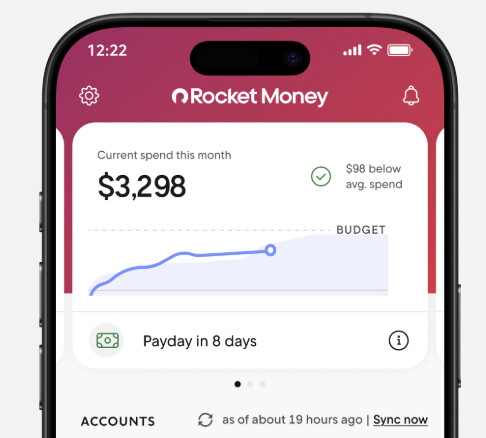
Once your accounts are connected, you’ll see a home dashboard displaying your current balances, recent transactions, and upcoming bills. From there, you can navigate to separate tabs for budgets, subscriptions, savings goals, credit monitoring, and net worth tracking.
Most U.S. banks and major credit cards work seamlessly through Plaid, though some smaller credit unions may occasionally experience sync delays or require re-authentication. This isn’t unique to Rocket Money. It’s a common quirk across all Plaid-based budgeting apps.
The important distinction: the free version gives you aggregated views and basic spending insights, but most of the “hands-off help” like concierge subscription cancellation, advanced budgets, and premium support requires a paid subscription.
Core Features: What You Actually Get
This section breaks down each major Rocket Money feature and whether it meaningfully adds value beyond what you can do yourself. The goal is to help you determine if rocket money’s features justify the monthly fee for your specific situation.
Subscription Management
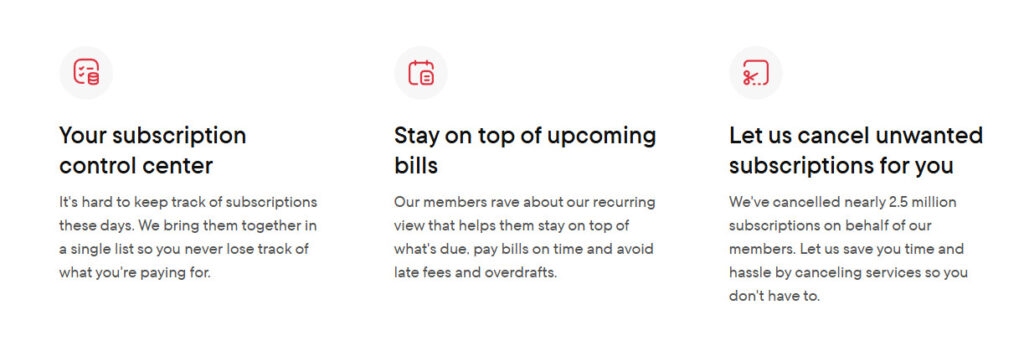
Rocket Money automatically monitors your linked accounts to identify recurring charges (streaming services, software subscriptions, gym memberships, app purchases and more) and groups them on a dedicated subscriptions screen.
What it catches:
- Free trials about to convert into paid plans
- Price increases on services you forgot you had
- Duplicate subscriptions (like multiple music services)
- Unwanted subscriptions you’re paying for but never use
Free vs. premium:
- Free users can view their subscription list and manually cancel subscriptions themselves
- Premium users may access a concierge service that can cancel subscriptions on their behalf
Limitations to understand:
- Some “hard-to-cancel” services (certain gyms requiring in-person visits or certified mail) may still require you to take action
- Concierge processing can sometimes be slower than just doing it yourself
- Not every subscription can be cancelled through the service
When this is worth it: If Rocket Money helps you cancel subscriptions and save money, say $20 to $50 per month in forgotten charges, the premium subscription pays for itself quickly. If you already track your spending habits carefully and review statements monthly, this feature adds less value.
Stop canceling subscriptions yourself. Rocket Money Premium’s concierge team does it for you. Try Premium free for 7 days.
Bill Negotiation
The bill negotiation service works by contacting your service providers (internet, cable, mobile, sometimes utilities) to negotiate lower rates or promotional pricing on your behalf.
How the fee structure works:
- Rocket Money charges 35% to 60% of the first year’s savings on the free and Premium plans
- Example: If they negotiate $200 in annual savings, you might pay $70 to $120
- Fees are typically charged upfront or in installments
- On Premium+ there is no negotiation fee at all: whatever comes off the bill is yours
The trade-off reality:
- Convenient for people who absolutely won’t call providers themselves
- You can often call yourself and keep 100% of the savings
- Some negotiated deals may downgrade your service tier or add 1-year promo pricing that expires
Before accepting a negotiation result: Check exactly what was changed on your account. Sometimes “savings” come from service downgrades you didn’t want.
When bill negotiation is worth it:
- Beneficial for busy users who genuinely never negotiate bills and have let rates creep up for years
- Not ideal for those comfortable making a 15-minute phone call, or anyone on tight cash flow who doesn’t want large one-time fee charges
Budgeting Tools
Rocket Money builds a starter budget by analyzing your financial data:
- Averages your recent income from detected paychecks
- Auto-categorizes past transactions into spending categories (groceries, rent, dining, transportation, etc.)
- Suggests category-level spending limits based on your spending patterns
Free plan limitations:
- Basic budgets with standard budget categories
- Limited customization options
Premium unlocks:
- Create unlimited budgets
- Custom categories and transaction rules
- Advanced overspending alerts
The categorization reality: Automatic categorization is imperfect. You’ll find restaurant meals labeled as “groceries,” gas stations categorized as “shopping,” or Venmo payments in random categories. Users should routinely review and correct mis-labeled transactions to keep their budget accurate.
You can create manual rules (premium feature) so future transactions from specific merchants always land in the right category, but this requires upfront effort.
Budgeting style comparison: Rocket Money is more “monitor and adjust” than strict zero-based budgeting. If you want to assign every dollar a job before the month starts, tools like YNAB may suit you better. Rocket Money works well for casual budgeters who want visibility into their spending patterns without intense manual tracking.
Spending Insights and Alerts
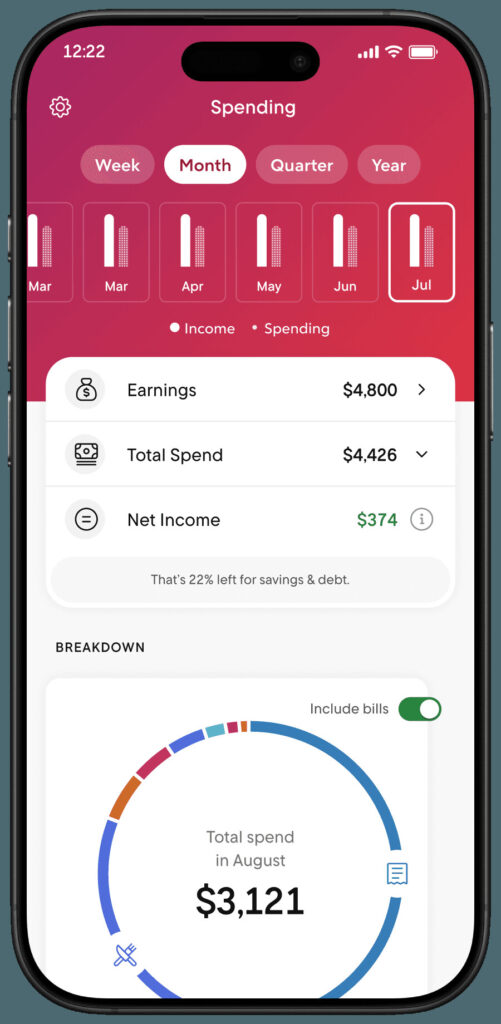
The spending insights dashboard provides visual charts showing:
- Total monthly spend vs. previous months
- Top spending categories (where most of your money goes)
- Top merchants (which stores and services get the most spend)
- Income vs. expenses over various time periods (weekly, monthly, quarterly, yearly)
Alerts you can set up:
- Large transaction notifications
- Upcoming bill reminders
- Low balance warnings
- Category limit alerts (premium feature)
Practical benefits:
- Catch potentially fraudulent activity quickly
- Avoid overdrafts with low balance warnings
- Identify spending “leaks” like repeated takeout orders or impulse purchases
These tools highlight issues but don’t automatically change your behavior. You still need to act on the information. The app just makes problems visible.
Automatic Savings and Financial Goals
The Financial Goals feature lets you set up automated saving toward specific targets:
- Set a target amount (e.g., $1,000 emergency fund, $2,500 vacation)
- Choose a deadline and contribution frequency (weekly or monthly)
- Rocket Money automates transfers to a linked savings account
Many users connect to Rocket Money’s smart savings account, which may offer competitive APY rates through partner banks.
What you get vs. doing it yourself:
- Visual progress bars toward each goal
- Consolidated view with your budget and spending insights
- Motivation from seeing multiple money goals in one place
You can achieve the same outcome by setting up automatic transfers directly with your bank. Rocket Money’s value here is convenience and visualization, not unique functionality.
Important checks:
- Verify which institution holds your savings (should be FDIC-insured, often shown as member FDIC through a partner bank)
- Confirm current APY rates, which can change
- Understand transfer timing to avoid overdrafts
When automatic savings features are worth it: For users who never get around to setting up recurring transfers, this removes friction. Less valuable if you already automate saving through your checking account or employer.
Credit Score Monitoring
Rocket Money provides your credit score and credit report details (often via Experian data) with:
- Historical score trends over time
- Factor breakdowns (payment history, credit utilization, account age, etc.)
- Alerts for score changes
What this helps with:
- Tracking how your financial health evolves
- Seeing how credit card balances and new accounts impact your score
- Spotting potential errors that may need dispute
The reality check: Similar credit monitoring is available for free from Credit Karma, Experian’s own app, and many bank apps. This feature alone does not justify paying for Rocket Money premium.
One note: The app may surface offers for personal loans, credit cards, or other products from Rocket Companies. Evaluate any such offers separately and cautiously. They’re presented for business reasons, not necessarily because they’re the best option for your personal finances.
Credit score monitoring is a “nice-to-have” within one dashboard, not a core reason to subscribe.
Net Worth Tracker
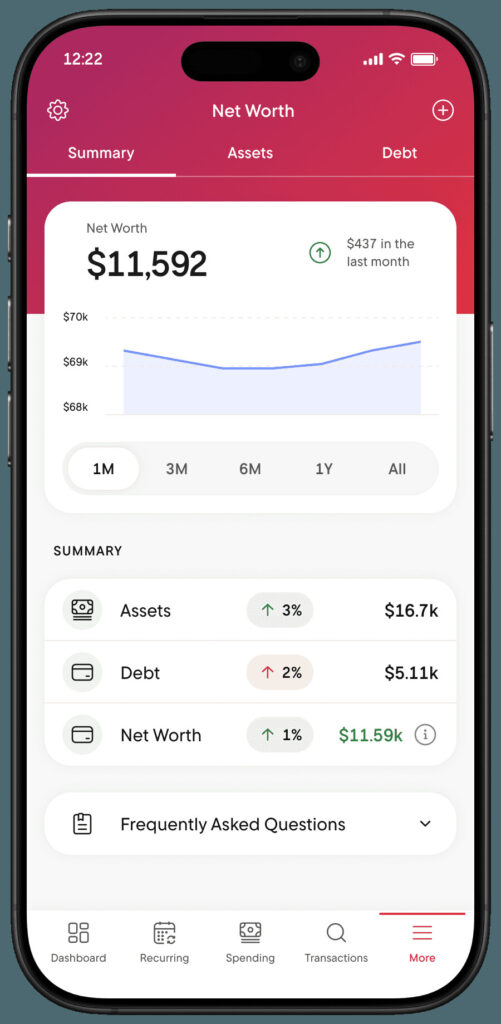
Net worth tracking combines all your assets and liabilities into a single running graph:
Assets tracked:
- Cash in checking and savings accounts
- Investment and retirement accounts
- Real estate (can be added manually or monitored automatically)
- Other assets like vehicles or collectibles (manual entry)
Liabilities tracked:
- Credit card balances
- Student loans
- Auto loans
- Mortgages and personal loans
You can track all your assets and all your financial information in one place, watching your net worth trend over months and years.
Benefits:
- Simple visual of long-term financial progress
- Motivating to see debt fall and investments rise
- Consolidated view of your complete financial picture
The DIY alternative: Computing net worth is straightforward in a spreadsheet. Rocket Money’s value is automation and convenience, not unique insight. If you update a simple spreadsheet quarterly anyway, this feature adds less.
Recommendation: Update manual asset values periodically (home values annually, vehicle values when relevant) to keep the picture realistic.
Account Linking and All-in-One View
Rocket Money uses Plaid to connect multiple accounts:
- Checking and savings from various banks
- Credit cards across issuers
- Loans (auto, student, personal, mortgage)
- Investment and retirement accounts
The main benefit: A single dashboard instead of logging into multiple bank accounts, brokerage apps, and loan servicers. You see all your finances in one consolidated view.
Setting expectations: Many competitors now offer similar linking capabilities, so this is table stakes for budgeting apps in 2026, not a unique differentiator. Occasional sync delays or re-authorization requirements happen across all Plaid-based apps.
This unified view is often what makes the app feel “worth it” to visual, big-picture budgeters who want to see their complete financial life without jumping between apps.
See everything, fix everything. Rocket Money Premium turns your all-in-one dashboard into an all-in-one savings machine. Join the members putting it to work, free for 7 days.
How Much Does Rocket Money Cost in 2026?
The rocket money app is free to download on iOS, Android, and web. Here’s how the pricing breaks down:
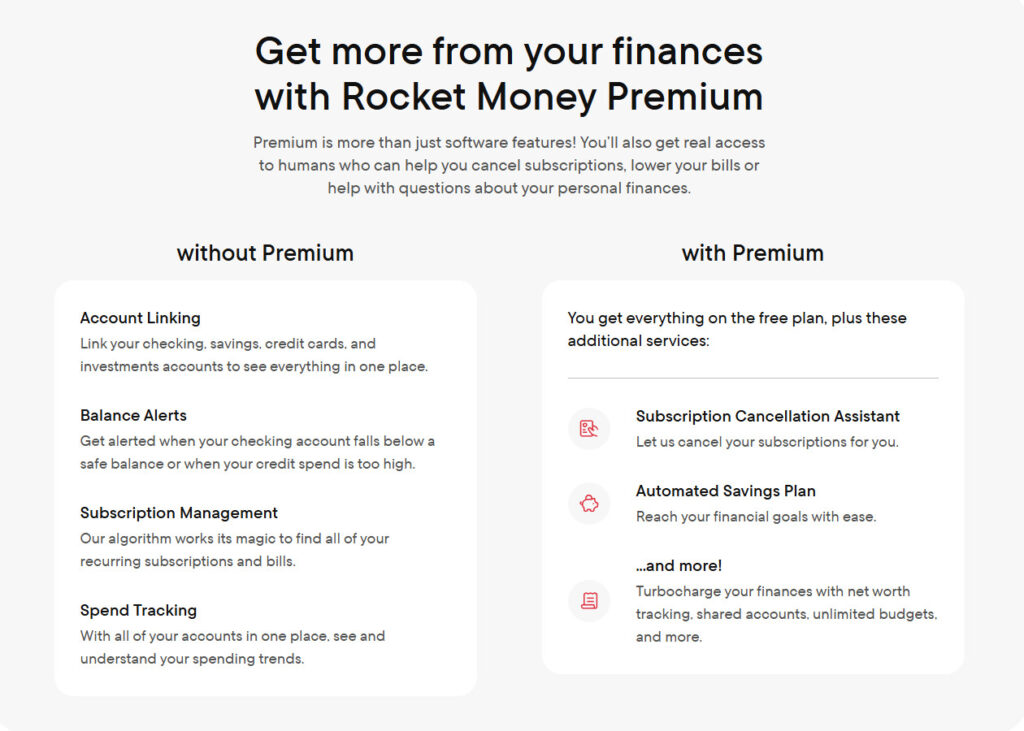
Free Plan Includes:
- Basic account linking and balance views
- Subscription tracking with up to 2 custom budget categories (view only, no concierge cancellation)
- Access to bill negotiation (Rocket Money’s team negotiates on your behalf; a performance fee applies only if successful)
- Upcoming bill tracking and transaction history
- Basic alerts and spending insights
- Credit score viewing
- Dark mode
- Financial education center
Premium Membership Includes:
- Unlimited budgets and custom categories
- Advanced notifications and granular spending insights
- Subscription cancellation concierge (where available)
- Full Financial Goals automation with smart savings features
- Complete credit and net worth tracking tools
- Priority customer support
- Additional features like transaction rules and same features across web and mobile
- AI companion (coming soon to Premium)
Premium Pricing:
- Sliding scale: $7 to $14 per month (you choose what you pay), or $15 a month for Premium+
- Billed monthly, with no annual plan and no lock-in
- 7-day free trial before commitment
Important: Set a reminder to cancel before the trial ends if you’re unsure about continuing.
Bill Negotiation Fees (Separate from Monthly Pricing):
- 35% to 60% of the first year’s savings
- Charged upfront or in installments
- Can result in substantial one-time charges
Read the bill negotiation agreement carefully before authorizing. Much does rocket money charge? For negotiation, it’s that percentage of savings, which can be significant if they negotiate large reductions.
Rocket Money Reviews: What Users Say (2026)
As of 2026, Rocket Money is well rated on the app stores: about 4.5 stars on the Apple App Store (285,000+ ratings) and 4.6 stars on Google Play (117,000+ ratings). Independent review site Trustpilot is tougher at roughly 3.3/5. Users most often praise the automatic subscription tracking, the clean budgeting dashboard, and the one-tap cancellation feature.
| Platform | Rating (2026) | Reviews |
|---|---|---|
| Apple App Store | 4.5 / 5 | 285,000+ |
| Google Play | 4.6 / 5 | 117,000+ |
| Trustpilot | ~3.3 / 5 | 4,000+ |
The most common complaints are worth knowing before you subscribe: some users say bill-negotiation fees (35%–60% of first-year savings) were charged without them realizing negotiation was underway; others report friction canceling Premium or occasional charges after cancellation; and support is email-based, which can slow urgent fixes. Enabling alerts and reviewing the Premium terms before opting into bill negotiation avoids most of these issues.
Is Rocket Money Safe?
A common question: is rocket money safe to use with your banking credentials and financial information?
Security practices:
- Uses Plaid for account connections. Rocket Money never sees or stores your actual bank login credentials
- Employs bank-level AES-256-bit encryption for data at rest and in transit
- Uses secure HTTPS connections with industry-standard security controls
- Ongoing security monitoring and updates
Savings account protection:
- Rocket Money’s Financial Goals / smart savings feature holds funds at nbkc bank, Member FDIC (Rocket Money itself is a financial technology company, not a bank)
- Protection up to $250,000 per depositor, per institution, per ownership category
- Verify the current partner bank name in-app for your records
What users should still do:
- Use strong, unique passwords for your Rocket Money account
- Enable device-level security (Face ID, fingerprint, PIN)
- Know how to remotely wipe your phone if lost or stolen
- Be cautious of phishing emails pretending to be from Rocket Money or Plaid
Perspective on complaints: Most negative feedback online involves bill negotiation fees, unexpected charges, or cancellation confusion, not security breaches or hacking. This is an important distinction between “safety” concerns and “satisfaction” issues. The app’s security infrastructure aligns with 2026 industry standards.
Who Is Rocket Money Best For (and Who Should Probably Skip It)?
Rocket Money isn’t one-size-fits-all. It works exceptionally well for certain types of budgeters while adding minimal value for others.
Ideal users:
- People transitioning from Mint (shutdown March 2024) who want a familiar, automated dashboard experience
- Busy professionals with multiple cards, bank accounts, and subscriptions who rarely review statements
- Users who avoid making customer service calls and would rather pay for bill negotiations or concierge cancellations
- Beginners who want a simple, visual overview of their personal finances rather than complex spreadsheets
- Anyone who wants to see all your finances in one place without logging into multiple apps
Who might not find it worth paying:
- Advanced budgeters who love zero-based budgeting and detailed rule systems (YNAB or manual methods may work better)
- Frugal users who don’t want to share account data with third-party apps
- People disciplined enough to cancel subscriptions and negotiate bills themselves
- Users already getting free credit monitoring from their bank or dedicated apps
- Anyone who already tracks spending closely through their checking account app
Questions to ask yourself:
- Do you routinely discover recurring charges you forgot about?
- Have you procrastinated calling your cable, internet, or cell phone company for months or years?
- Do you open your banking app daily already, or do statements go unreviewed?
- Does the idea of managing money in a spreadsheet appeal to you or stress you out?
- Would you benefit from seeing your financial health visualized in one dashboard?
Your answers determine whether the premium version delivers enough value to justify the monthly fee.
You’ve seen who Rocket Money Premium is built for. If that’s you, join 10M+ members who’ve stopped wasting money on autopilot. Start your free 7-day trial now.
Is Rocket Money Worth It? Final Verdict
| Rocket Money Free | Rocket Money Premium |
|---|---|---|
| Overall Rating: | ⭐⭐⭐ | ⭐⭐⭐⭐⭐ |
| Best for: | Users who want to monitor spending and see subscriptions | Users who want to actively save money and automate their finances |
| Retail Cost: | $0 | $7–$14/month (your choice) |
| Current Promotion: | No cost, no trial needed | 7-DAY FREE TRIAL for new users |
| Biggest Benefit: | See all your finances in one place | Cancel subscriptions + automate savings + negotiate bills |
| What You Get: | Account aggregation Basic budgeting Subscription tracking (view only) Spending insights | Subscription cancellation concierge Unlimited budgets + custom rules Advanced alerts Smart savings automation Priority support |
| Biggest Limitation: | You still have to do everything manually | Bill negotiation fees |
| Why Upgrade: | Awareness without action | Turns insights into actual savings without effort |
| Claim to Fame: | Simple, free financial dashboard | Hands-off money management for subscriptions, bills, and savings |
| Typical User Outcome: | “I should fix this later…” | “That’s already handled” |
| Current Offer: | Free | Start your FREE TRIAL, see what you can cancel in minutes |
For many casual budgeters with subscription clutter, multiple accounts, and no existing system, Rocket Money premium at the lower end of the scale (around $7/month) can quickly pay for itself. The combination of subscription management, consolidated account views, and spending alerts surfaces problems you’d otherwise miss. If the app helps you cancel subscriptions even one or two $10+ subscriptions in your first month, you’ve already covered the cost.
For detail-oriented, DIY-inclined users who already track spending, negotiate their own bills, and maintain their own budgets, the free plan, or entirely different tools, may be a better fit. The premium features solve problems these users don’t have.
Key upsides worth remembering:
- Easy consolidated view across all bank accounts, cards, loans, and investments
- Strong subscription management that catches forgotten recurring charges
- Hands-off convenience for users who won’t manage money manually
- Solid security through Plaid integration and encryption
- Competitive with other budgeting apps as a best budgeting app contender for visual learners
Key downsides to weigh:
- Premium paywall locks the most useful features
- Bill negotiation success fees (35–60% of first year’s savings) can be substantial
- Auto-categorization still requires user review and correction
- Not ideal for strict, zero-based budgeting enthusiasts
Recommended approach:
- Try the 7-day free trial
- Intentionally test subscription tools, alerts, and budgets for a full month
- Track whether you actually save time and money
- Decide if the value justifies your specific monthly fee
In the 2026 environment, post-Mint and with more competition among budgeting apps than ever, Rocket Money offers a compelling package for the right user. Whether it’s worth it ultimately depends on one thing: how actively you’ll engage with whichever tool you choose. The app can surface every problem, but you still have to act on what it finds.
FAQs
Rocket Money offers a free plan that lets you link accounts, view balances, track spending, and see a list of subscriptions. However, most hands-off features, including concierge subscription cancellation, advanced budgeting tools and enhanced alerts, require a paid premium plan.
Premium users can request subscription cancellations through Rocket Money’s concierge service. Rocket Money contacts the provider on your behalf and attempts to cancel the service, saving you from calling or navigating cancellation policies yourself. Some subscriptions still require user action, especially those with in-person or written cancellation requirements.
It can, but results vary. Rocket Money is most effective for users with forgotten subscriptions or long-neglected bills. If you cancel even one or two unused subscriptions, the app can quickly pay for itself. Start your free trial to see what it finds in your accounts.
Rocket Money premium uses a sliding-scale pricing model ranging from $7 to $14 per month, depending on what you choose to pay. There’s also a 7-day free trial, after which billing begins unless you cancel.
For many users, yes. Rocket Money offers account aggregation, spending insights, subscription tracking, and net worth monitoring similar to Mint. However, it is less focused on strict budgeting and more geared toward convenience and automation.