
Learning to invest intelligently in the stock market is now easier than ever with our new AI Wealth Wizard.
Never invested before? No problem.
Not sure what to buy? No problem.
The AI Wealth Wizard acts as your built-in portfolio assistant. It asks a series of key questions and then lays out an intelligent, methodical list of recommendations to help you get started.
You’ll find the Wealth Wizard on the Open Positions page. After you’ve started building your portfolio and made a few investments of your own, simply visit your Open Positions page to receive structured feedback and guidance on the stocks you currently hold.
Step 1: Launch the Wealth Wizard
To get started, navigate to your Open Positions page and open the AI Wealth Wizard.
If you’re new to investing, this is the easiest way to move from “Where do I begin?” to placing your first trade with a thoughtful strategy in place.

Step 2: Answer a Few Simple Questions

The Wizard will guide you through a short series of questions designed to shape your investment strategy:
- How much money do you want to invest today?
- How many stocks would you like to buy?
- How many sectors would you like to diversify across?
- Are there specific sectors you want to overweight?
- What is your risk level (conservative, moderate, aggressive)?
- Do you want to target a specific dividend yield?
These prompts help you think intentionally about diversification, allocation, and risk before making your first investment.
Step 3: Review Your Recommendations and Place Your Trade
Based on your answers, the Wealth Wizard generates personalized stock suggestions aligned with your preferences.
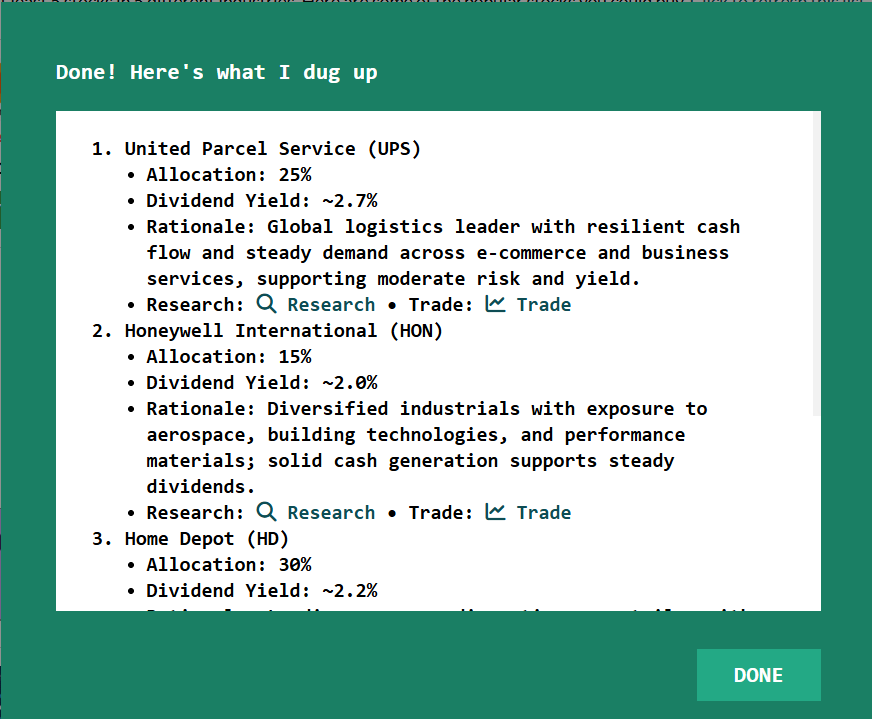
Each recommendation includes:
- Suggested allocation percentages
- Dividend information
- A strategic explanation
- A direct link to Research
- A one-click option to Trade
From there, you can review the details, conduct additional research if you’d like, and execute your trade — all in just a few clicks.
After Your First Trade
Once you’ve started building your portfolio, the AI Wealth Wizard continues to support you.
As you add more positions, it can review your holdings and provide structured feedback to help you stay diversified and aligned with your goals.
Enabling the Wealth Wizard for Classroom Contests
If you’re running a classroom contest or trading competition, you can enable the Wealth Wizard during contest setup.
When creating a new Stock Game:
- Go to your game setup settings
- Toggle Enable Wealth Wizard → Yes
- Choose either Express or Custom setup
- Launch your contest
Once enabled, participants will have access to the AI Wealth Wizard inside their trading dashboard.
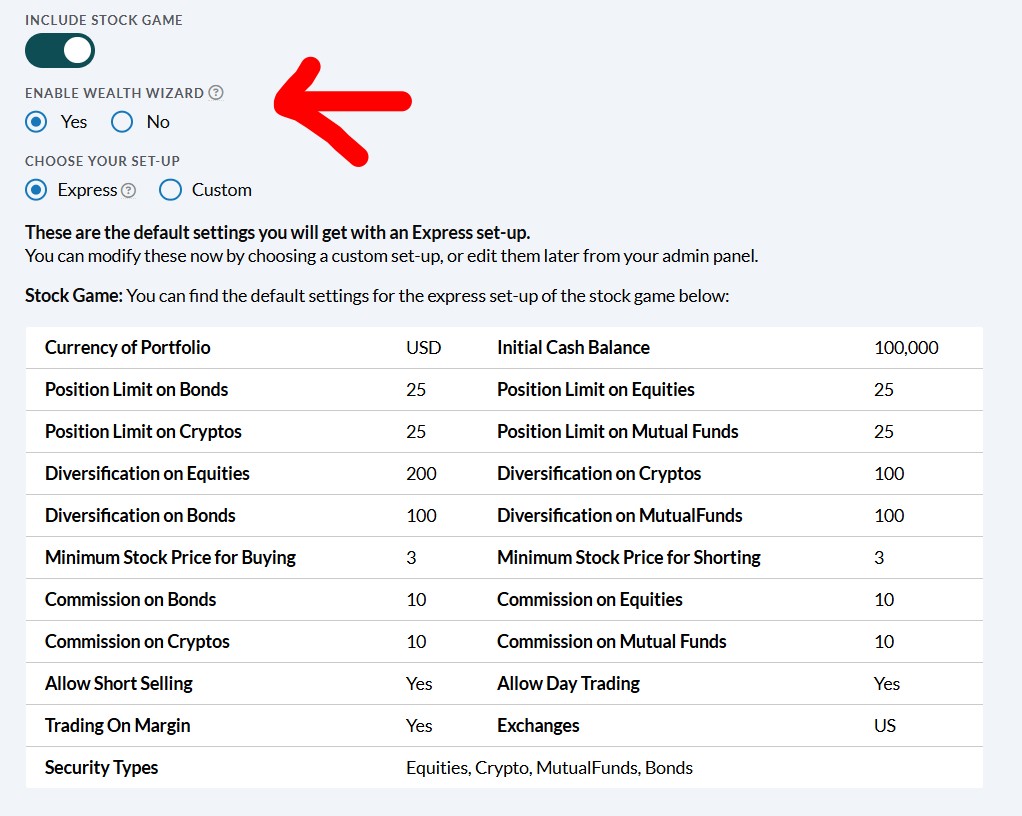
You can choose either Express or Custom setup — just ensure the Wealth Wizard is turned on before launching the contest. Once enabled, participants will have access to the guided portfolio builder inside their trading dashboard
A Smarter Way to Build Portfolios
The AI Wealth Wizard doesn’t automate investing — it enhances decision-making.
It helps users:
- Build diversified portfolios intentionally
- Align allocations with risk tolerance
- Explore income-focused or growth-focused strategies
- Quickly test different portfolio approaches
Whether you’re new to investing or refining a strategy, the Wealth Wizard provides structured guidance while keeping you in control of every trade.
The AI Wealth Wizard is now available inside Wall Street Survivor — ready to help you build smarter, more diversified portfolios.